
Microsoft's biggest Copilot update folds chat, delegated work, app building, and Office into one app — but the real story is Autopilot: a persistent agent with its own identity, permissions, and cost controls. Agents are moving into the infrastructure layer.
Key takeaways
- Four pieces, one surface: Home (Chat + Cowork), Office in Copilot, Code (plain-language app builder), and Autopilot (persistent background agent).
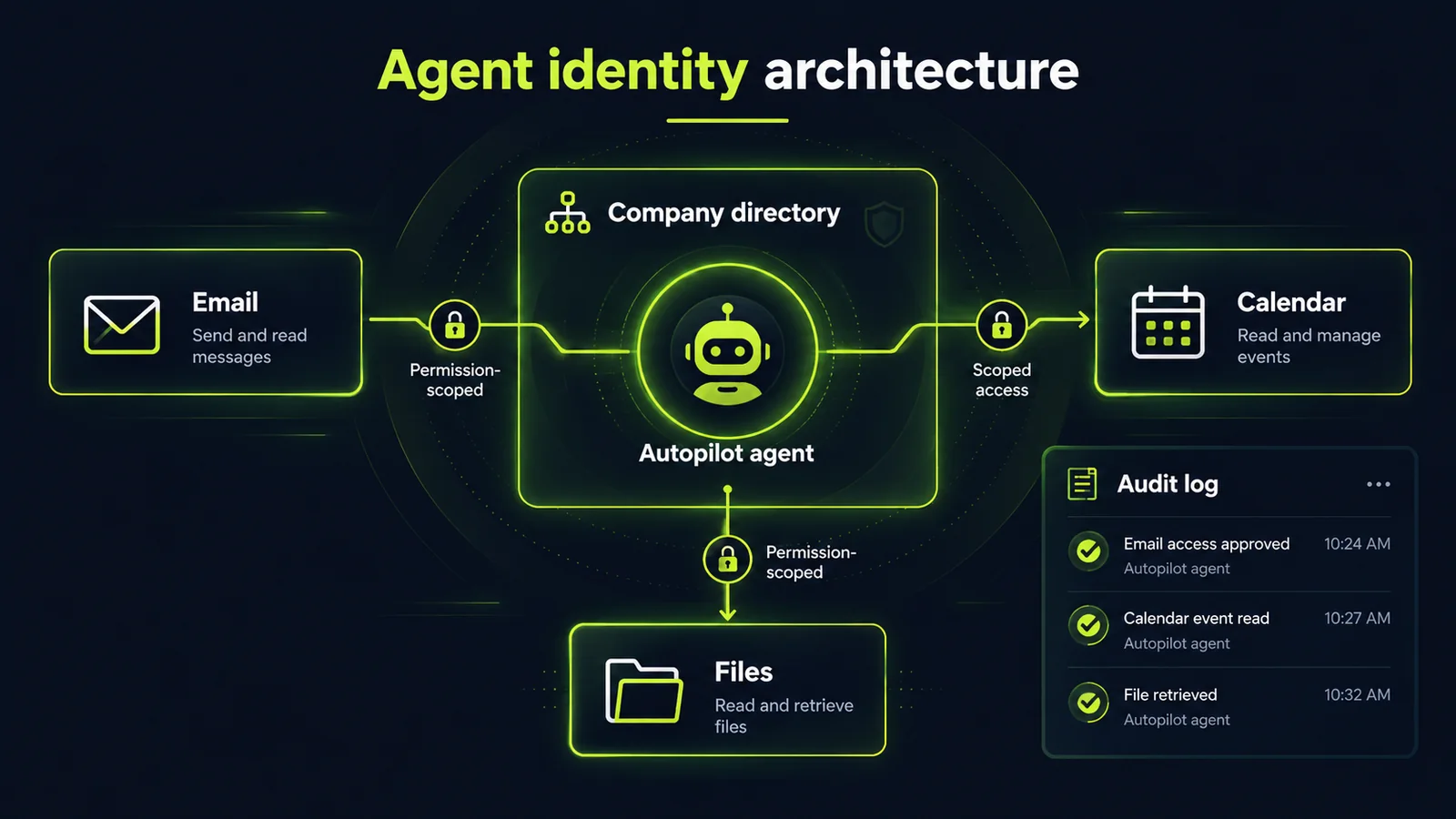
- Autopilot gets its own directory identity — account, email, calendar, storage — provisioned and deprovisioned like a coworker. That's the governance primitive enterprises have been waiting for.
- Code targets the long tail of internal tooling: small apps hosted inside your tenant under IT governance via Copilot Managed Runtime.
- New FinOps dashboards expose AI usage costs — table stakes now that agent features bill on consumption, not flat seats.
- Bottom line: this is a planning window, not a buying decision. Draft your agent-identity policy now, before the agents arrive.
On September 25, Microsoft announced what CEO Satya Nadella called the company's "biggest update to Copilot to date" — folding chat, long-running delegated work, natural-language app building, and the full Office suite into one redesigned app. His framing: Copilot is becoming "a new OS for work that spans every model, every form factor and every task." (Reuters)
The headline is corporate consolidation. The substance is more interesting: Microsoft is moving AI agents from bolted-on chatbots into managed infrastructure — with their own identities, permissions, and cost controls.
What changed: four pieces, one surface
Home is the new starting point. Chat handles quick questions and drafting; Cowork takes longer, defined assignments — an RFP response, a launch kit, a financial close package — and returns a finished result.
Office in Copilot embeds Word, Excel, and PowerPoint directly in the app, so requests produce real files that stay synced with the Office apps.
Code lets people describe an app, dashboard, tracker, or workflow in plain language and get a working result — powered by the same underlying technology as GitHub Copilot, running in a sandbox, with the option to host the result inside the company's own tenant.
Autopilot — previously called Scout when unveiled in June — is a persistent agent that keeps working in the background: watching channels, following up on threads, running recurring tasks without being asked each time.
An upcoming change routes each request to the right capability automatically — Chat, Cowork, or Code — so users stop picking modes. Rollout: Home via the Frontier early-access program in the coming weeks; Code to early-access customers at month's end, then Premium/Pro preview later this year; Autopilot to private preview at the end of September. (PYMNTS)
Autopilot is the interesting piece
Every vendor now has an "agent." What distinguishes Autopilot is the plumbing around it.
The agent gets its own identity in the company directory — account, email, calendar, storage, Teams presence — with permissions the owner controls and colleagues able to @mention it in Teams or Outlook. It is provisioned like a coworker, governed like one, and deprovisioned like one.
This answers the objection that has stalled enterprise agent adoption for a year. As Copilot product chief Annie Pearl put it: "It's been very hard for many organizations to bring agents into the enterprise because of security, compliance and governance concerns."
The industry is converging fast: agents are moving into the infrastructure layer, and the winning vendors will be the ones that give IT a real administrative surface — identity, permissions, audit trails, lifecycle management. Microsoft's advantage is simply that it already owns the directory, the identity provider, and the collaboration stack most companies run on.
Code: plain-language apps, hosted inside your tenant
The second piece worth taking seriously is Code. Microsoft's pitch: small, purpose-built apps — trackers, dashboards, internal tools — are becoming a fourth unit of knowledge work alongside the document, the spreadsheet, and the deck.
Underneath sits Copilot Managed Runtime (now in preview), which hosts generated apps inside a customer's tenant under IT governance, with live-data connections and zero-downtime deployments. (TestingCatalog)
The strategic read: this isn't competing with professional developers — Microsoft noted its own engineers keep using GitHub Copilot. It targets the long tail of internal tooling requests that never make an engineering roadmap: the dashboard the operations lead keeps rebuilding in a spreadsheet, the intake tracker a team hacks together in shared notes.
If business users can generate and run those inside a governed tenant, the shadow-tool problem shrinks — and IT keeps the audit trail.
The catch is the same one behind every "citizen developer" promise: someone still has to own the result. Generated apps need named owners, data-access reviews, and a plan for when the person who built them leaves.
The quiet signal: FinOps for AI
Easy to miss in the launch, harder to miss in your budget: Microsoft also unveiled cost-management capabilities giving employees and admins direct insight into AI usage costs.
That matters because advanced agent features increasingly run on usage-based billing rather than flat seats. Enterprises are already nervous about AI spend climbing invisibly. Giving finance and IT a real dashboard — and separating fixed subscription use from consumption-based agent work — is table stakes for agent adoption at scale.
The competitive context
Several outlets read this as Microsoft retreating from the crowded personal chatbot race and consolidating around corporate users — Fortune framed it earlier this year as a "super app" play against ChatGPT, Gemini, and Claude.
For business buyers, that framing is clarifying. Microsoft is reorganizing Copilot around the assumption that AI belongs in the flow of work. The chatbot era of Copilot — a tab you visit with a question — is being replaced by a background presence that watches, builds, and acts.
What this means for your business
Autopilot isn't generally available yet — private preview starts at the end of September. So this is a planning window, not a buying decision. Use it.
Draft your agent-identity policy now. Autopilot's model — one agent, one identity, scoped permissions — is the right primitive, but the policy still has to come from you: who can provision an agent, what it may touch, what happens when its owner leaves.
Inventory your Copilot licenses and spend. Before the broader previews land later this year, know what you pay for — and whether the new FinOps dashboards will be enabled for your early testers. You can't govern usage-based AI spend you can't see.
Pick one shadow-tool candidate for Code. The strongest near-term use case is the internal tracker or dashboard your team keeps rebuilding by hand. Identify one, define the data sources and access rules, and be ready to pilot Code on it under IT supervision.
Separate the experiment budget from the operations budget. Agent features on usage-based pricing will fail every ROI comparison if evaluated like flat-seat software. Ring-fence a small metered budget, define what "worked" means before you start, and expand only on measured results.
The bottom line
Microsoft's biggest Copilot update isn't really about chat. It's about moving agents into the infrastructure layer — with identities, permissions, tenant hosting, and cost visibility — and treating small generated apps as normal knowledge work.
That's the right direction, and it's the direction every enterprise AI program will have to follow: the agent is no longer a demo. It's a managed resource.
If you run on Microsoft 365, the next two quarters are when that shift lands on your tenant. The teams that get value will be the ones that did the governance homework first.
Want a practitioner to look at your setup before the agents arrive? Get a free AI audit — we map where automation actually pays for your business and where it's just noise, and you get a concrete action plan out of it.
FAQ
What is Microsoft Autopilot?
Autopilot (previously "Scout") is a persistent AI agent inside the redesigned Copilot app. It works in the background — watching channels, following up on threads, running recurring tasks — with its own directory identity, permissions, and Teams presence. Private preview began end of September 2026.
What is Copilot Code?
A plain-language app builder: describe a tracker, dashboard, or internal tool and get a working app, hosted inside your company's tenant under IT governance via Copilot Managed Runtime. It targets the long tail of internal tooling, not professional software development.
How is this different from the old Copilot chatbot?
The old model was a tab you visited with a question. The new model embeds AI in the flow of work — delegated multi-step assignments (Cowork), background agents (Autopilot), generated apps (Code), and Office files produced in-app.
What should IT teams do now?
Draft an agent-identity policy (provisioning, permissions, offboarding), inventory Copilot spend before usage-based billing spreads, and identify one internal tool as a Code pilot candidate — under IT supervision, with named owners.
Sources
Sources
- Microsoft Revamps Copilot With Code Generation, Agentic AI Toolsreuters.com
- Microsoft Bundles Copilot Features to Challenge Anthropic, OpenAI in the Workplacepymnts.com
- Microsoft Brings Home, Code and Autopilot to Copilottestingcatalog.com
Want to know what this means for your stack? A free AI audit maps your workflows and shows where automation pays off — in your numbers, not ours.